
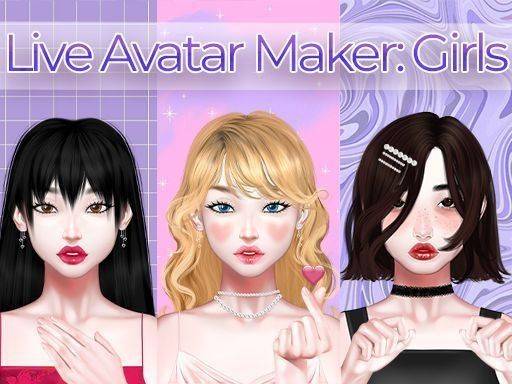
Anime Character Creator Studio
About
Anime Character Creator Studio offers a rich, family-friendly experience for designing anime-style avatars. The intuitive controls make it easy to customize facial features, hairstyles, and outfits. The animated expressions add a lively touch. It is perfect for creative expression and profile picture creation.
Game Introduction
Anime Character Creator Studio invites you into a vibrant world of character design. This game is a creative studio where you build a unique anime-style persona from scratch. It focuses on artistic expression and personal style in a safe, positive environment. You can dream up characters for stories, create profile pictures, or simply enjoy the fun of design. The intuitive interface makes it easy for anyone to start crafting their digital self.
How to Play
Getting started is simple. First, choose a base skin tone for your character. Then, customize facial features like eyes, nose, lips, and eyebrows using sliders and tap-to-select options. Pick a hairstyle and adjust its color. The real magic happens with animated expressions: tap emotion icons to see your avatar smile, laugh, or look surprised. Next, visit the fashion wardrobe to dress your character in stylish clothes and accessories. Finally, apply virtual makeup to complete the look. Your creation is saved in your gallery.
Game Features
Key features include a highly customizable anime avatar creator. Animated facial expressions and emotions bring your character to life. A vast collection of stylish clothes and accessories lets you explore fashion. Detailed makeup and hairstyle options allow for personal touches. The environment is family-friendly and positive.
Tips for Success
Experiment with different combinations of facial features, hairstyles, and outfits to discover your unique style. Use the emotion icons to see how your avatar looks with various expressions, which can help you refine the character's personality. Save multiple versions of your avatar to compare looks or create a series of characters for different purposes, such as social media profiles or story illustrations.





Comments
Sign in to comment
You must be logged in before posting a review or rating.
No account? Create one
No comments yet. Be the first to comment!