
Penguin Star Puzzle Arcade
About
Penguin Star Puzzle Arcade offers a refreshingly simple yet engaging experience for players of all ages. The click-to-jump mechanic is easy to learn but requires precise timing to master. Bright, cheerful graphics create a welcoming atmosphere, while the increasing difficulty keeps the challenge alive. It's a safe, family-friendly choice for casual gaming sessions.
Game Introduction
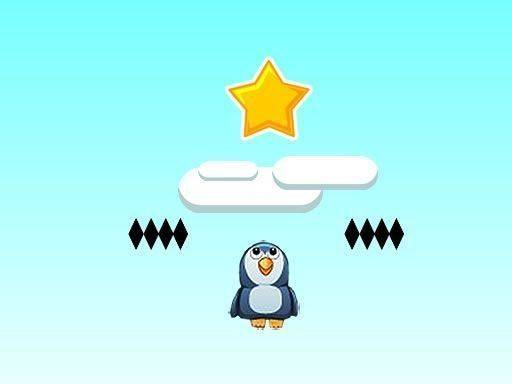
Penguin Star Puzzle Arcade is a cheerful arcade puzzle game where players guide a penguin on a mission to collect gold stars. The stars have fallen low, giving the penguin a chance to grab them. Players must time their clicks carefully to bounce the penguin upward, avoiding dark platforms that can knock him down. The playing field also has edges on both sides that are best avoided. This game is suitable for players of all ages, offering a simple yet challenging experience that tests reflexes and timing. With its bright graphics and straightforward mechanics, Penguin Star Puzzle Arcade provides hours of fun without any inappropriate content, making it a safe choice for family entertainment.
How to Play
To play Penguin Star Puzzle Arcade, simply click on the penguin to make him bounce. The goal is to collect as many gold stars as possible while navigating the environment. Watch out for dark platforms that appear—they can stop the penguin and end the run. Also, be mindful of the edges on the left and right sides of the field; touching them is undesirable and can lead to failure. The key to success is timing clicks perfectly to avoid obstacles and gather stars. The game is easy to pick up but offers increasing difficulty as players progress, keeping them engaged. There are no complex controls or instructions—just click, bounce, and enjoy the challenge.
Game Features
Simple click-to-jump mechanics make the game easy to learn. Family-friendly design ensures safe play for all ages. Addictive obstacle avoidance keeps players coming back for more. The game includes a star-collecting mission that provides a clear objective. Bright and cheerful graphics create an inviting atmosphere. The increasing difficulty as players progress adds to the challenge without overwhelming new players.
Tips for Success
Practice timing to bounce the penguin precisely when needed. Focus on collecting gold stars while staying aware of the dark platforms and edges. Take breaks if feeling frustrated, as a calm mind helps with timing. Learn the patterns of obstacles to anticipate their placement. Remember that the game is meant to be fun, so enjoy the process of improving your score over time.






Comments
Sign in to comment
You must be logged in before posting a review or rating.
No account? Create one
No comments yet. Be the first to comment!